How to Choose Commercial Smart Locks for Your Business?

Choosing commercial smart locks is not simply a technology purchase. It is an access-control decision affecting employees, visitors, contractors, and valuable assets.

The commercial smart lock market is expanding quickly. Fortune Business Insights valued the global smart lock market at approximately $2.21 billion in 2023. It projects growth to $5.49 billion by 2030. However, broad market growth does not guarantee stronger workplace security. A sleek mobile app may still hide weak credential recovery, poor battery alerts, or limited offline access.

NIST computer scientist Michael Fagan describes the central principle clearly: “IoT cybersecurity is a shared responsibility.” That responsibility includes the lock manufacturer, business owner, installer, and daily administrator. It also continues after installation. When an employee leaves, can access disappear within minutes? When the network fails, will the glass entrance remain secure? These practical questions matter more than a long feature list.

A reliable evaluation should examine encryption, administrator permissions, audit logs, emergency access, firmware updates, and integration with existing systems. Test the lock on a real delivery door, not only in a showroom. Check whether the battery survives heavy daily use. Review how quickly support responds when a credential fails at 7:00 a.m.

This guide compares commercial smart locks through security, usability, durability, total cost, and management effort. Some assumptions may need challenging. More connectivity is not always better. The best lock is the one your team can operate correctly, monitor consistently, and recover safely when conditions become imperfect.

How to Choose Commercial Smart Locks for Your Business?

Define Your Business’s Access Control Requirements

Before selecting a commercial smart lock, map how people move through your business each day.

List employees, contractors, visitors, and delivery staff separately. Then mark every entrance, interior door, storage room, and emergency exit. A small clinic may need reception access, private treatment rooms, and restricted records storage. Do not rely on assumptions. Observe a normal opening and closing shift. This often reveals shared keys, propped doors, or access that remains active after staff leave.

Define permissions by role, time, and location.

A cleaner may enter after closing, while a sales assistant needs showroom access during business hours. Temporary workers should receive time-limited credentials, not permanent access. Decide whether users need phone credentials, PINs, cards, or a combination. Consider practical failures. What happens when a phone battery dies, the network drops, or someone forgets a code? A reliable plan includes a controlled backup method, activity logs, and a clear process for revoking access. Test that process with a real staff member before deployment.

Record requirements in a simple access matrix.

Include the door name, approved users, schedule, approval owner, and review date. Confirm door hardware and exit behavior with a qualified security or fire-safety professional. Review access monthly at first, then adjust schedules to actual traffic. An initial policy may be wrong. That is useful. Unexpected bottlenecks, forgotten visitors, or overly broad permissions show where the design needs refinement. Choose hardware only after these details are verified.

Compare Smart Lock Types and Commercial Entry Configurations

Commercial smart locks should match how your building actually operates, not simply how modern they look.

A keypad lock suits staff entrances and shared offices. RFID or NFC credentials work well when employees need quick, controlled access. Mobile credentials reduce physical cards, but they depend on charged phones and reliable permissions. Biometric readers can improve accountability, though some users may find them slower or less comfortable.

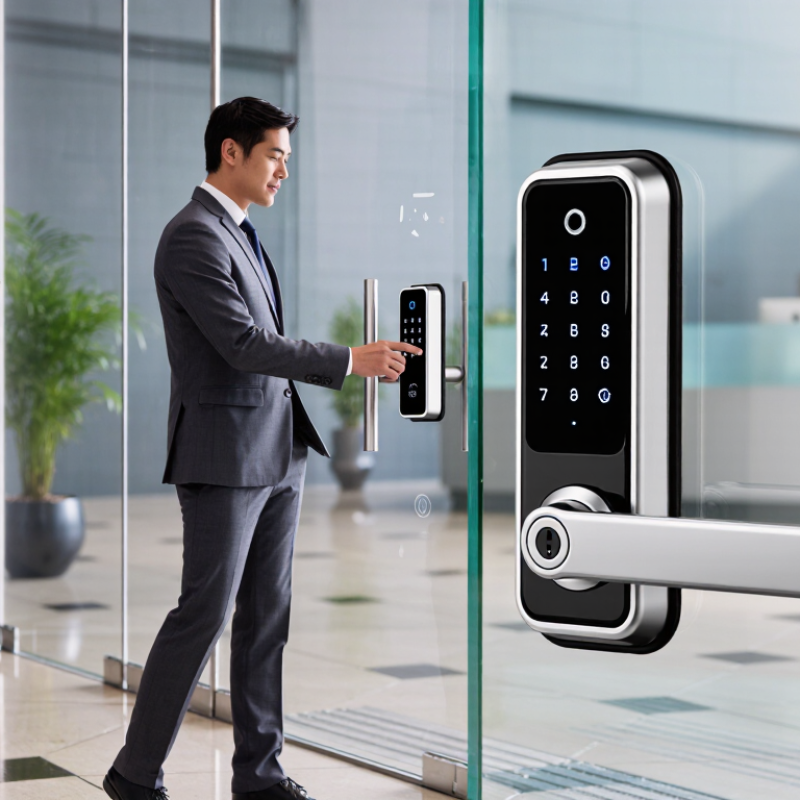
Entry configuration matters just as much as lock type. A single wooden door may need a mortise lock with an interior handle. Glass doors often require compatible surface-mounted hardware. Double doors need careful alignment, especially during busy hours. For server rooms or stock areas, choose access records, timed permissions, and alerts for forced entry. Networked locks provide central control, while offline models can keep working during an internet outage. That difference is easy to underestimate.

Safety must guide the final choice. Confirm how the lock behaves during power loss, fire alarms, and emergency exit use.

Check local fire, accessibility, and privacy requirements with qualified professionals. In field installations, the reader is rarely the hardest part. Door frames, wiring routes, and inconsistent user habits create more trouble. Test the system with cleaners, contractors, managers, and visitors before full deployment.

A design that works for administrators may frustrate everyone else. My own preference is to pilot one entrance first, because a small trial often exposes assumptions that drawings conceal.

Evaluate Security Features, Credentials, and User Permissions

Choosing a commercial smart lock starts with the door, not the app. Inspect the frame, strike plate, hinges, and daily traffic. A strong credential system cannot fix a weak door. In busy offices, I prefer locks with encrypted communication, tamper alerts, and offline access records. Battery warnings should appear before failure, not after an employee waits outside. That delay is costly.

Evaluate how credentials are issued, changed, and revoked. Mobile credentials are convenient, but shared phones create accountability problems. Use unique codes or cards for staff, contractors, and visitors. Require multi-factor authentication for administrators, especially when remote unlocking is enabled. Ask whether the system records who opened which door, at what time, and under what permission. A timestamp alone is insufficient. It should identify the credential and event status.

User permissions need practical boundaries. An employee may enter the warehouse during a shift but not the finance room. Temporary access should expire automatically after a project ends. Review access lists monthly, and remove unused accounts immediately. During a pilot, test power loss, network failure, emergency egress, and repeated incorrect codes. Real conditions expose weaknesses. I once underestimated visitor access, leaving too many manual exceptions. That experience changed my checklist: every exception needs an owner, expiry date, and review trail. Choose a system that makes safe behavior easier, even when staff are busy.

How to Choose Commercial Smart Locks for Your Business?

Compare the security factors that matter most when evaluating commercial smart locks. The weighted scores below represent a practical assessment model for business deployments, focusing on protection, accountability, and controlled access.

How to read the chart: Prioritize strong authentication, detailed audit logs, encrypted communication, and role-based permissions. Access schedules, remote administration, and tamper resistance should also be evaluated according to the building’s risk level and operating requirements.

Check Integration, Installation, and Compatibility Requirements

How to Choose Commercial Smart Locks for Your Business?

A commercial smart lock should fit your daily workflow, not simply add another gadget. Fit matters. Before purchasing, inspect the existing doors, frames, hinges, and access points. Measure the lock body and cylinder carefully. Small gaps matter. A lock that works in a showroom may fail on a reinforced door or a narrow glass entrance. Check whether the system supports your current access cards, mobile credentials, exit devices, and emergency hardware. Compatibility problems are expensive to correct after installation.

Integration deserves equal attention. Confirm that the lock can connect with your access control platform, visitor management tools, alarm system, or employee directory. Ask how user data is synchronized and what happens when the network fails. Offline access is important. Test it early. Request clear documentation for software interfaces, permissions, audit logs, and firmware updates. A technically impressive system may still create extra work for reception staff if its controls are confusing.

Installation should be planned around business hours, building materials, and local safety requirements. In my experience, a small pilot on one entrance reveals more than a polished demonstration. Let installers test door alignment, signal strength, battery access, and emergency release procedures. Keep a manual fallback available. Do not assume every door behaves consistently. Review the results with employees who use the entrance daily, because their practical feedback may expose problems that specifications miss. Reliable selection comes from testing the complete system, not judging the lock alone.

How to Choose Commercial Smart Locks for Your Business? — Check Integration, Installation, and Compatibility Requirements

Lock Type Best Business Use Integration Requirements Installation Requirements Compatibility Checks Typical Power Operational Considerations
Electronic Lever Lock Office doors, classrooms, staff-only rooms, and interior commercial areas. May connect through a wired controller, wireless gateway, or access-control platform. Confirm support for scheduled permissions, audit logs, and remote administration. Usually replaces an existing lever lock. Verify door handing, latch dimensions, backset, door thickness, and clearance around the lever. Check the existing mortise or cylindrical preparation, fire-rating requirements, and whether the door is listed for the selected hardware. Battery-powered or low-voltage wired. Good for controlled employee access; battery alerts and mechanical key override should be available where required.
Electronic Mortise Lock Main entrances, offices requiring stronger latching, hotels, healthcare areas, and high-use commercial doors. Best suited to centralized access-control systems with event reporting, role-based permissions, and optional request-to-exit monitoring. Requires a compatible mortise pocket and accurate door preparation. Professional installation is recommended for alignment and latch adjustment. Confirm mortise case dimensions, spindle position, door thickness, frame alignment, and compatibility with existing cylinders or thumb turns. Battery-powered or low-voltage wired. Provides integrated latch and lever hardware, but installation tolerances are more demanding than retrofit locks.
Electric Strike Existing cylindrical lock or mortise lock openings where the business wants controlled entry without replacing the door lock body. Requires a compatible access controller, credential reader, exit device, door-position sensor, and a suitable power supply. Installed in the door frame. The frame must have enough space and strength for the strike body, wiring, and faceplate. Check latch shape, frame material, lock type, voltage, current draw, fail-safe or fail-secure configuration, and fire-door approval. Normally low-voltage wired. Useful for retrofit projects; correct fire and egress configuration must be confirmed before installation.
Electric Exit Device Emergency exits, corridors, warehouses, retail back doors, and wide commercial doors. Can integrate with access controllers, fire-alarm interfaces, door-position sensors, and request-to-exit devices. Requires correct device length, mounting height, door width, end-cap clearance, and power-transfer hardware for moving doors. Check single or double-door configuration, rim or mortise style, fire-rating, panic-hardware rules, and exterior trim compatibility. Low-voltage wired or battery-assisted, depending on configuration. Life-safety compliance is critical; access control must not prevent required emergency egress.
Wireless Cylindrical Lock Multi-room offices, small branches, clinics, and facilities where cabling is difficult or disruptive. Requires a compatible wireless gateway or hub if remote management, centralized audit logs, or automatic updates are needed. Generally retrofit-friendly, but accurate door measurements and reliable wireless coverage are still required. Verify lock bore, backset, door thickness, lever handing, cylinder format, and wireless protocol supported by the management system. Battery-powered. Plan for battery replacement, radio coverage testing, and offline operation if the network becomes unavailable.
Smart Padlock Gates, storage cages, equipment rooms, temporary sites, and non-egress assets. May use Bluetooth, cellular, or a gateway-based platform for user assignment, activity records, and remote status checks. No door preparation is normally required, but the shackle must fit the hasp and provide adequate clearance for operation. Check shackle diameter, opening height, weather exposure, corrosion resistance, operating temperature, and network availability. Battery-powered. Not generally suitable for required building exits or doors that need continuous life-safety hardware.
Interconnected Smart Lock Small offices, rental workspaces, and low-volume commercial rooms with a deadbolt and latch operated together. Commonly supports mobile credentials, keypad entry, or a remote gateway. Confirm user limits, audit-log retention, and administrator controls. Requires compatible deadbolt spacing, door thickness, interior clearance, and correct alignment between the latch and strike. Check bore locations, deadbolt type, strike dimensions, door swing, and whether the door is fire-rated or part of a required egress route. Battery-powered. Simple to deploy, but it may offer fewer access-control functions than commercial mortise or wired systems.
Selection checklist: Confirm the door type and dimensions, required security level, fire and egress obligations, access credentials, network coverage, integration protocol, power strategy, offline behavior, audit-log requirements, administrator roles, maintenance schedule, and warranty support before purchase.

Assess Costs, Maintenance, and Long-Term Business Value

How to Choose Commercial Smart Locks for Your Business?

Choosing a commercial smart lock begins with total cost, not the keypad price. Include installation, access software, batteries, network hardware, and staff training. A low-cost lock may become expensive when doors need custom wiring or frequent service calls. Ask for five-year estimates, including replacement parts and support response times. Request written warranty terms.

Maintenance affects daily operations and employee confidence. Facility managers should check battery alerts, connection stability, weather resistance, and emergency access procedures. A useful lock can record entry events, support quick access changes, and reduce rekeying after staff turnover. However, advanced features do not always create equal value. Some businesses pay for functions they rarely use. That deserves an honest review. Test the system on one busy door before expanding across the building. Observe morning traffic, failed credentials, and the time needed to restore access.

Tips: Compare service contracts carefully. Confirm who handles software updates and hardware failures. Keep spare batteries and a documented backup process onsite. Review access permissions every quarter, especially after role changes. Consider future growth, too. A system that works for ten employees may become awkward at one hundred. Track maintenance hours, access incidents, and replacement costs for several months. Real operating data often challenges the original purchase assumptions.

Start typing to see products you are looking for.
Sign in

No account yet?

NewSale
SHARE YOUR CART